Unleash Peak Performance: My Deep Dive into Water Cooled Gaming PCs
Why I Chose to Chill My Gaming Rig: The Allure of Water Cooling
As a passionate PC gamer and builder, I'm always looking for ways to push my hardware to its limits. When I first got into this hobby, air cooling seemed like the only realistic option. We'd slap on a big heatsink and a couple of fans, and that was that. But then I started seeing those stunning liquid-cooled rigs – the clean lines, the glowing coolant, the absolute silence – and I knew I had to explore it. Water cooling isn't just about aesthetics; it's a powerful tool for achieving optimal performance, reducing noise, and extending the life of your precious components. Let me tell you, it's a game-changer.
For anyone serious about gaming, especially if you're running high-end CPUs and GPUs or dipping your toes into overclocking, managing heat is absolutely crucial. These powerful components generate a lot of thermal energy, and if that heat isn't dissipated effectively, your system will throttle performance to prevent damage. Nobody wants their frames per second to drop mid-game, right? That's where water cooling comes in, offering significantly better thermal conductivity than air.
Two Paths to Liquid Cool: AIO vs. Custom Loops
When you're thinking about water cooling, you essentially have two main routes: All-in-One (AIO) coolers or a full-blown custom liquid cooling loop. Each has its own merits, and I've worked with both.
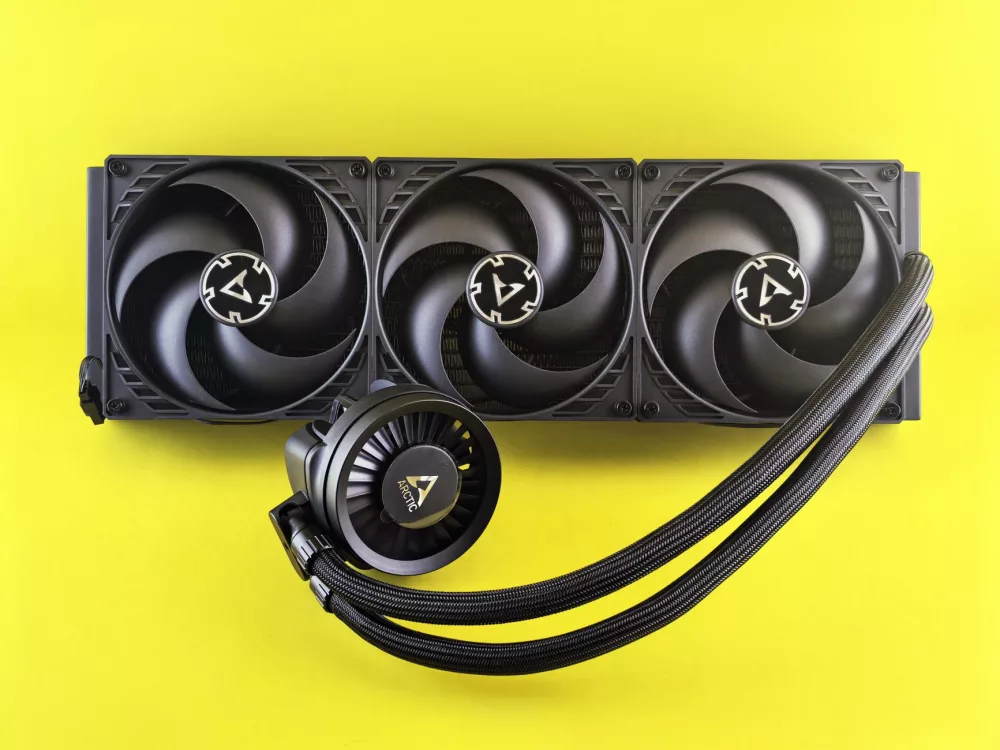
- All-in-One (AIO) Coolers: For many folks, an AIO cooler is the perfect stepping stone. These are self-contained units that come pre-filled and sealed, meaning you don't have to worry about assembly or leaks. They typically consist of a CPU block (which often has the pump integrated), tubing, a radiator, and fans. Installation is usually straightforward, not much harder than a high-end air cooler, honestly. They offer a significant upgrade over stock air coolers and even many aftermarket air solutions, providing better temperatures and quieter operation. If you're looking for an easy entry into liquid cooling without the complexity, an AIO is a fantastic choice. I've used several in builds for friends, and they're consistently reliable.
- Custom Liquid Cooling Loops: This is where I feel the true magic of PC customization lies. A custom loop is exactly what it sounds like: you design and build the entire cooling system yourself, piece by piece. This gives you ultimate control over performance, aesthetics, and which components you want to cool (CPU, GPU, even motherboard chipsets). While undeniably more complex and expensive, the rewards are substantial. You get the best possible thermal performance, the quietest operation, and an undeniably unique, often breathtaking, visual appeal. It's a project, for sure, but a deeply satisfying one.
Anatomy of a Custom Loop: What Goes Where?
Building a custom loop can seem intimidating at first, but once you break it down into its core components, it's a lot less scary. I'll walk you through the essentials:
- The Pump: This is the heart of your loop, circulating the coolant. You can't have a custom loop without one. I generally recommend strong, reliable pumps like those from D5 or DDC variants.
- The Reservoir: This holds excess coolant, making filling the loop much easier and also helps to bleed air bubbles from the system. Plus, a well-placed reservoir with vibrant coolant can be a real visual centerpiece.
- The Radiator(s): This is where the heat exchange happens. Hot coolant flows through finned channels, and fans blow air through those fins to cool it down. The size and thickness of your radiator(s) directly impact cooling performance. I usually recommend at least a 240mm or 360mm radiator, or even two if you're cooling both a CPU and a high-end GPU.
- The Fans: Crucial for pushing air through your radiators. You'll want static pressure optimized fans for this task, as they're designed to move air effectively through resistance.
- CPU and GPU Water Blocks: These are custom-engineered blocks that attach directly to your CPU and GPU, transferring heat from the component to the circulating coolant. They're typically made of copper or nickel-plated copper for excellent thermal conductivity. Cooling your GPU with a water block makes an enormous difference in both performance and noise, I've found.
- Tubing: You'll need tubing to connect all your components. You can choose between soft tubing (flexible, easier to install, lower maintenance) and hard tubing (rigid, more aesthetic, requires bending with heat). I've done both, and hard tubing definitely looks sleeker, but it takes more patience.
- Fittings: These are the connectors that secure your tubing to the blocks, pump, and radiator. There are various types, like compression fittings (most common for both soft and hard tubing) and push-to-connect. Make sure you use good quality ones; a leak is your worst nightmare.
- Coolant: This is the liquid itself, usually distilled water mixed with additives to prevent corrosion, algae growth, and improve thermal performance. You can get clear coolant or vibrant colored ones to match your build's theme.
The Undeniable Advantages: Why I Love Water Cooling
So, why go through all this effort? The benefits, in my opinion, are well worth it:
- Enhanced Performance: Lower temperatures mean your CPU and GPU can maintain higher boost clocks for longer periods. If you're into overclocking, water cooling provides the thermal headroom you need to really push those clock speeds, leading to noticeable performance gains in games and demanding applications. I've seen firsthand how a good water cooling setup can let a CPU or GPU hit clocks that would be impossible on air.
- Reduced Noise: This is a big one for me. High-performance air coolers often require fans to spin at high RPMs, creating a noticeable hum or whine. With water cooling, heat is dissipated over a larger surface area (the radiator), allowing fans to spin at much lower, quieter speeds, or even stop entirely during light loads. That annoying fan noise? It's practically gone.
- Stunning Aesthetics: Let's be honest, a custom water-cooled PC looks incredible. The intricate tubing runs, the visible coolant, and the lack of bulky air coolers create a clean, professional, and often breathtaking visual impact that few air-cooled systems can match. It's a true showcase for your hardware.
- Component Longevity: While not a guarantee, running your components at lower, more consistent temperatures can theoretically extend their lifespan. Less thermal stress is generally a good thing for electronics.
Things I've Learned: The Challenges and Considerations
It's not all rainbows and RGB, though. Water cooling, especially custom loops, comes with its own set of challenges:
- Cost: Let me tell ya, this isn't a budget-friendly endeavor. Custom loop components can be quite expensive, adding hundreds, sometimes over a thousand, dollars to your build cost. AIOs are more affordable, but still pricier than basic air coolers.
- Complexity of Installation: While AIOs are relatively easy, a custom loop requires careful planning, assembly, and leak testing. It's not a plug-and-play solution. You'll need some DIY skills and a good deal of patience. I remember my first hard tubing bends; it took me a good few tries!
- Maintenance: Water-cooled systems require a bit more attention. You'll need to periodically flush and refill your loop (usually annually), clean out any dust from radiators, and keep an eye on coolant levels. Leak testing is also a critical step during initial setup, believe me, you don't want a leak in your rig.
- Space Requirements: Radiators, especially larger ones, take up significant space in your PC case. You need to ensure your chosen case has adequate clearance for the radiators, fans, and pump/reservoir combo.
So, Is Water Cooling Right for Your Gaming PC?
It's a great question, and one I think every serious PC enthusiast eventually asks. If you're a casual gamer running a mid-range system, an AIO might be a nice upgrade for quietness and slightly better temps, but a custom loop might be overkill. However, if you're an enthusiast running a high-end CPU and GPU, pushing for maximum frame rates, dabbling in overclocking, or simply want the ultimate in quiet operation and visual appeal, then absolutely, water cooling is a fantastic investment. The satisfaction of building and optimizing your own liquid-cooled machine is an experience unlike any other in PC building. It's a journey, not just a destination, and I wouldn't trade my experience with it for anything.
About Editorial Team
Senior columnist and culture critic specializing in architectural designs, emerging high-growth systems, and contemporary philosophies.
Contact Desk
Have an editorial inquiry or custom partnership idea? Reach our team directly.